
Open sourceAGPL-3.0Self-hosted
Know where the hours went.
Tockr is project management with the timer built in, not bolted on. Boards, lists, timesheets and people reports in one Go binary with SQLite inside, running on your own server.
Free, with no paid tier. Built for a 1 vCPU / 512 MB server or a Raspberry Pi.
Time tracking
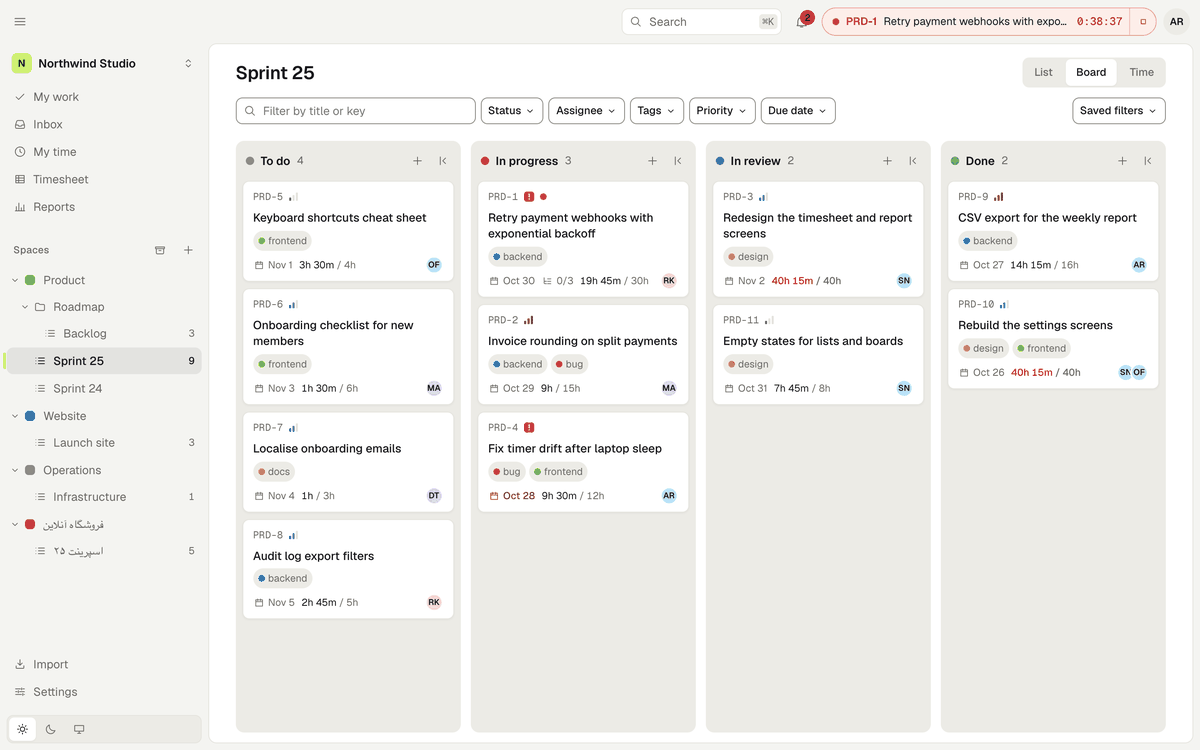
The timer is the product, not a plug-in.
Most tools sell time tracking as an add-on or leave it to an integration. In Tockr it lives in the same place as the work, and it is free.
- 01
One timer, on every screen
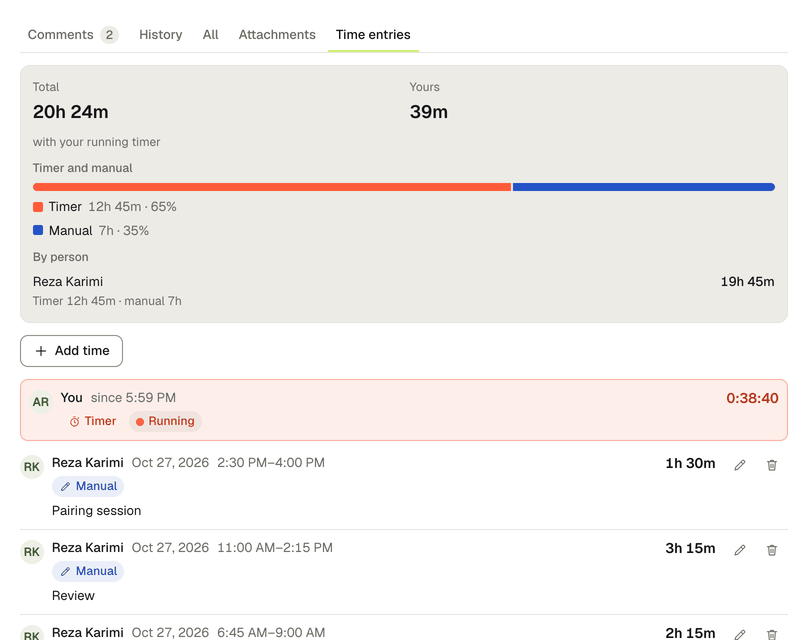
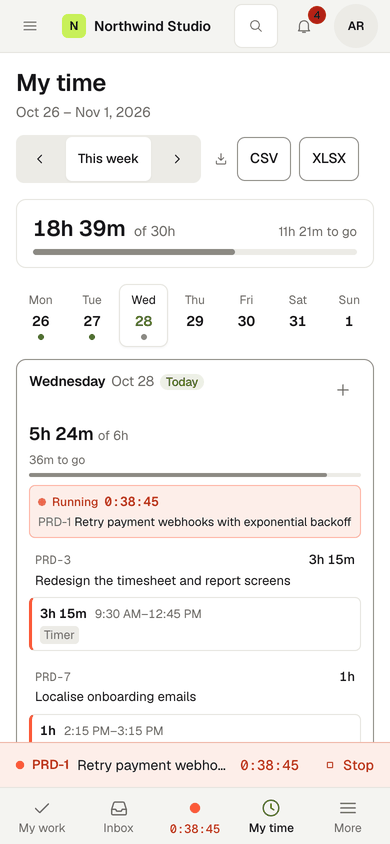
It sits in the header of every page and shows up in every open tab within a second. Press t on a task to start it; starting another task stops and saves the first.
- 02
Every entry says where it came from
Timer, manual or import, plus an “edited” marker. Edits keep the original value. Deleted entries leave the totals and stay in the history.
- 03
Type time the way you say it
The duration field understands all of these:
1h 30m90m1.5h1:30۱:۳۰ - 04
An edit lock you set
Members change entries from the last 7 days by default. You pick the window per workspace; admins have no limit.
Timesheets and reports
For whoever signs off the hours.
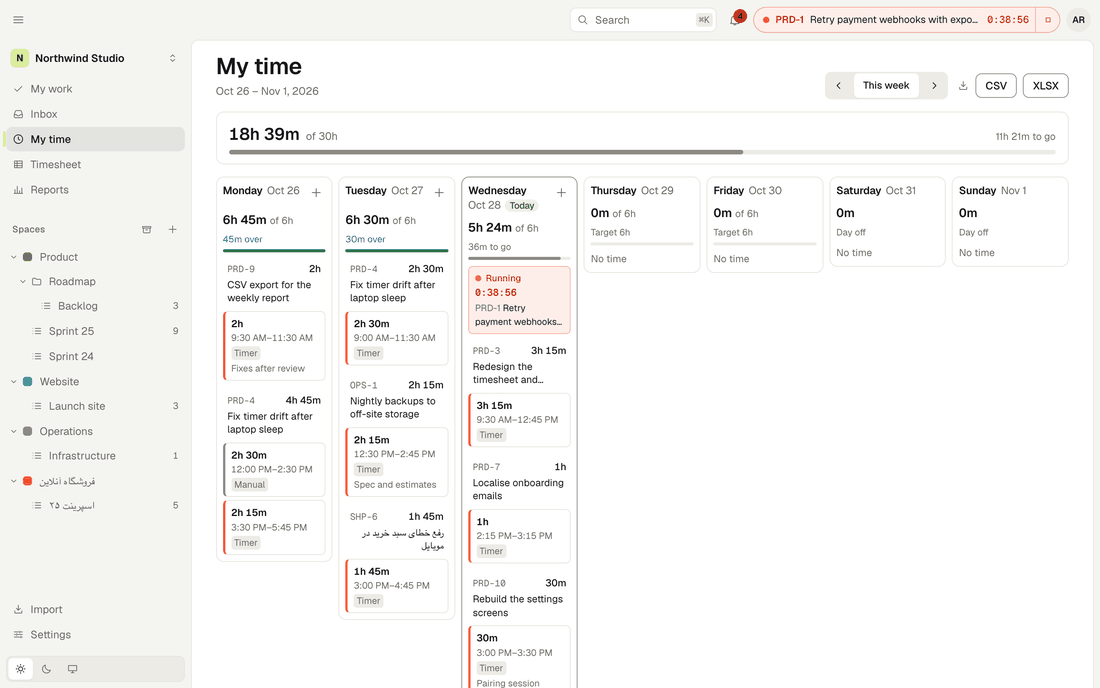
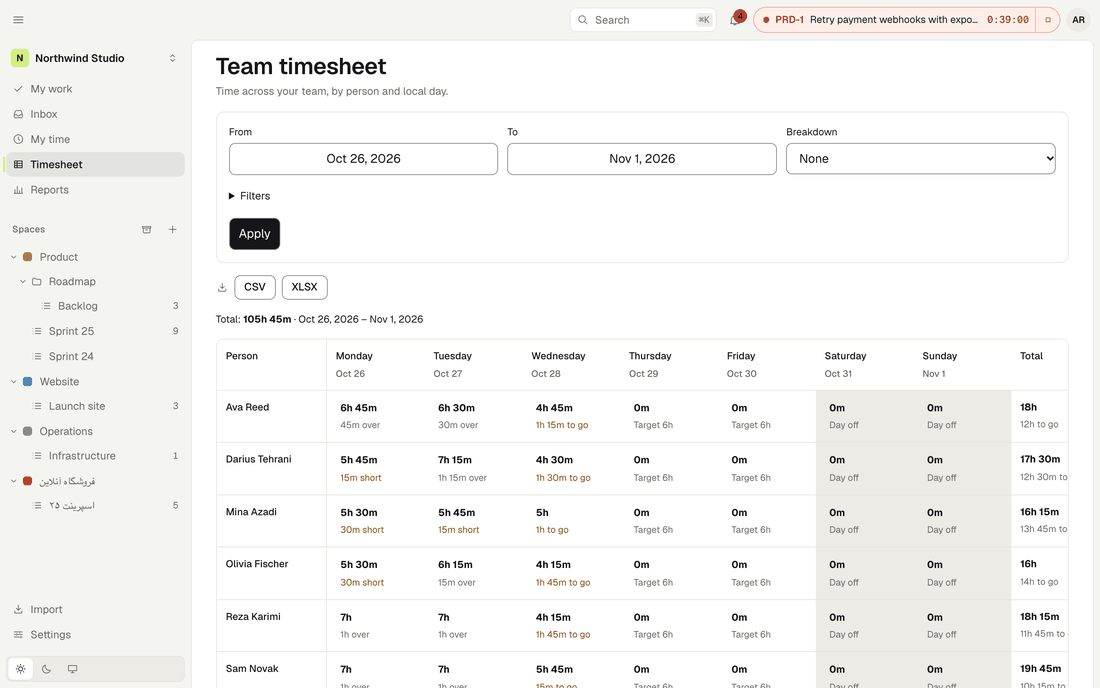
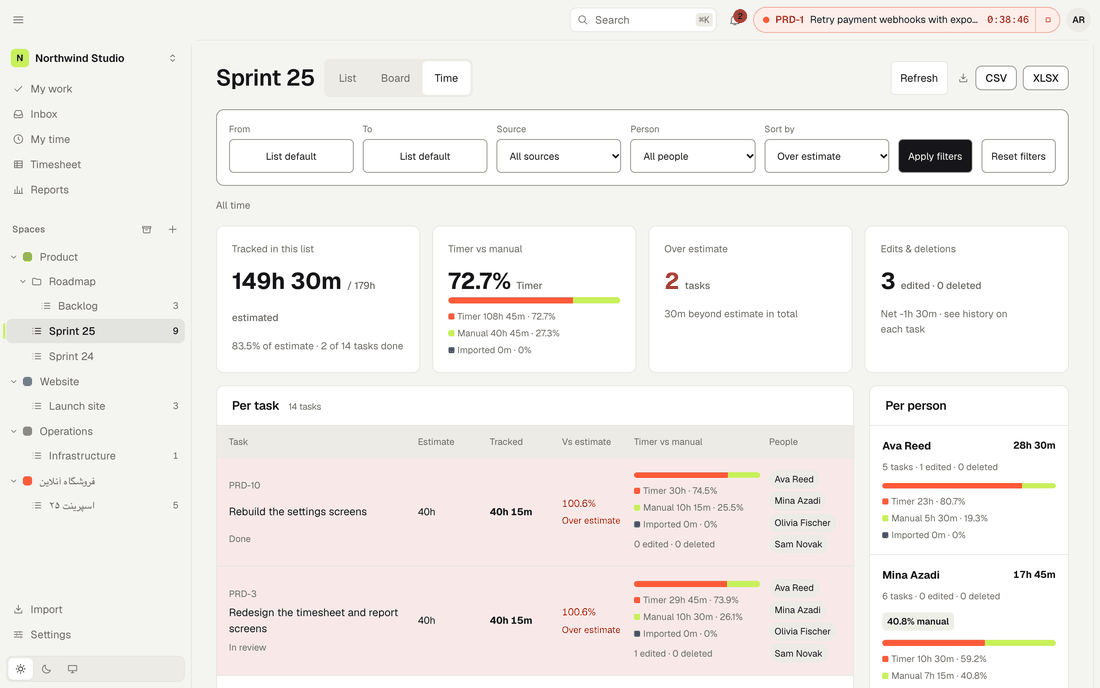
The team timesheet puts people against days. People & performance shows how time was tracked, not only how much, and compares each person with the team median. There are no leaderboards.
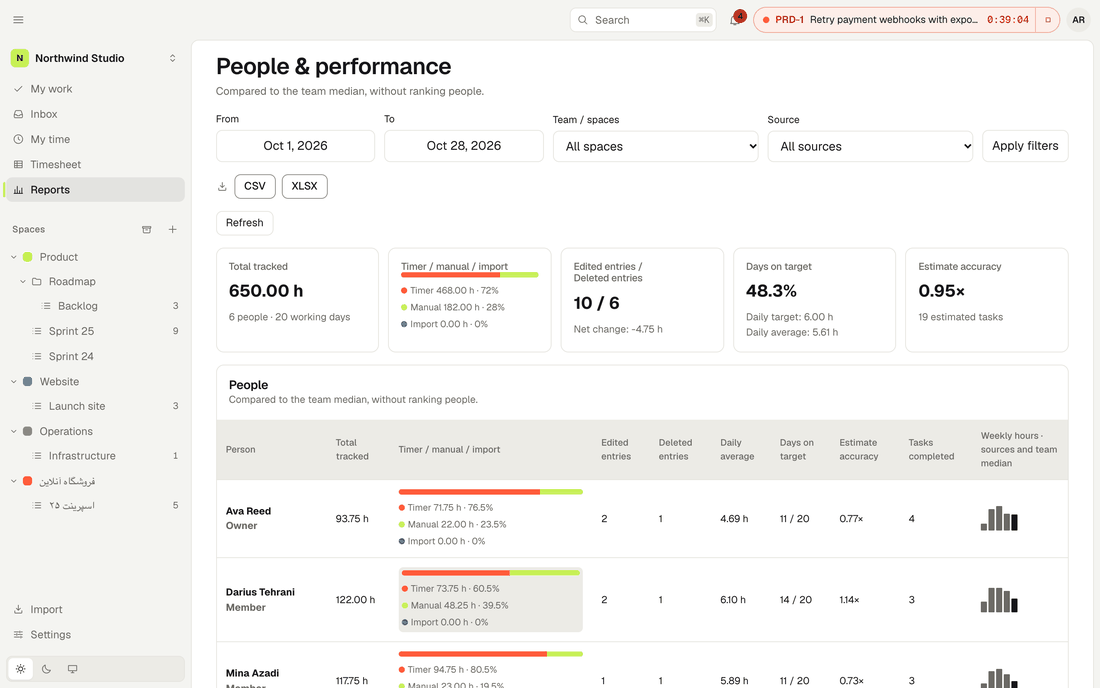
Timer versus manual
Hours and percentage per person. Edited and deleted entries are counted, with their net change.
Delivery, not just hours
Days on target, daily average, tasks completed, estimate accuracy and cycle time, for any range.
Export that adds up
CSV (UTF-8 with BOM) or XLSX, built from the same numbers as the screen, so the file totals match.
The work itself
Everything to plan the work, nothing to set up first.
- Workspaces, spaces, folders, lists, tasks and subtasks, with statuses per space, each in a to do, in progress or done group.
- List and board views. Group, sort and edit inline, or drag cards between columns, with a long press on touch screens.
- The task as a side panel with its own URL: Markdown comments,
@mentions, attachments by drag or paste, and a history of every change that nobody can edit. - Filters you can save by status, assignee, tag, priority, due date and text.
Keyboard
Fast where it counts.
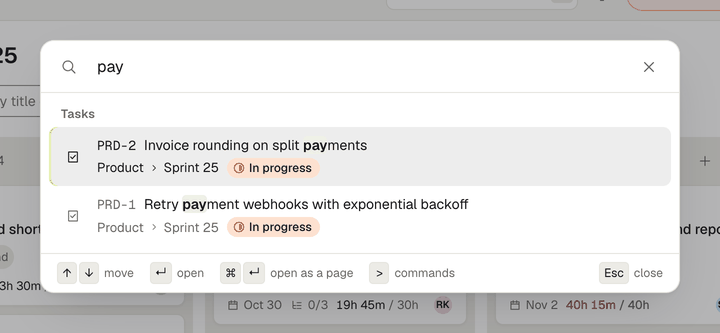
Edits apply at once and sync in the background. Quick search finds tasks by title or ID, Persian titles included, and runs commands.
- New task
- N
- Start or stop the timer on a task
- T
- Search and commands
- / or ⌘K
- All shortcuts
- ?
Also in the box
No plugins to buy, no services to wire up.
- Realtime
- Board moves, comments and timers reach teammates over server-sent events. After a dropped connection the page catches up by itself.
- Roles
- Owner, Admin, Member and Guest, plus custom roles built from a permission catalog, optionally limited to some spaces. Role changes go to the workspace audit log.
- Notifications
- An in-app inbox for assignments, mentions, due dates and missing hours. Email and a daily digest once you configure SMTP; without it nothing is sent.
- Sign-in
- Email and password, invites by email or link. Google and GitHub sign-in when you configure them.
- Your data
- One SQLite file, an online
tockr backup, an automatic backup before every upgrade, and a full workspace export as JSON plus attachments. - Phones
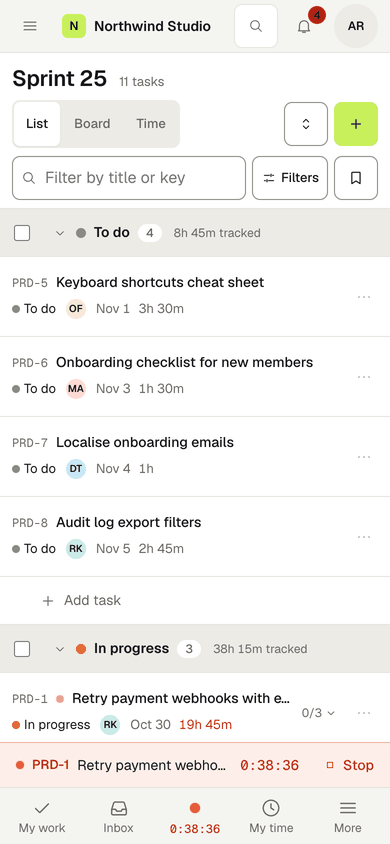
- A responsive web app from 360 px up, with a bottom tab bar and the timer above it. There are no native apps.
Light by design
Runs on the smallest server you have.
No database server, no cache, no queue, no object storage. One process and one data directory. Your data stays on your machine and Tockr sends no telemetry.
- static binary with the web app embedded. No C compiler needed to build it.
- 1
- on disk for the binary. Builds for Linux on amd64 and arm64.
- 20–25MB
- of memory when idle with an empty database, measured on a development machine.
- ~15MB
- memory cap in the shipped Docker Compose and systemd examples, sized for a 1 vCPU / 512 MB server.
- 256MB
- budget for any task filter, met at 10,000 and 50,000 tasks in the project’s benchmarks.
- <150ms
Figures come from the project’s documentation and benchmarks on development hardware, not a lab. Run make bench to measure on yours.
Get started
Two commands from a clone to a running server.
On first start the server prints a one-time setup link. Open it, create the admin account and your first workspace, then press the timer.
# needs Go 1.26, Node.js 24, make and git
$ git clone https://github.com/tockrhq/tockr.git
$ cd tockr
$ make build
$ ./tockr serve
Listens on :8080 and keeps its data in ./data. For HTTPS, backups and upgrades, read the self-hosting guide.
$ docker volume create tockr-data
$ docker run -d --name tockr --restart unless-stopped \
    -p 127.0.0.1:8080:8080 \
    -v tockr-data:/data \
    -e TOCKR_BASE_URL=https://tockr.example.com \
    -e GOMEMLIMIT=180MiB --memory 256m --pids-limit 256 \
    --read-only --tmpfs /tmp:size=64m,mode=1777 \
    --cap-drop ALL --security-opt no-new-privileges:true \
    ghcr.io/tockrhq/tockr:latest
The image is published with the first release. Until then, build it from the repository’s Dockerfile. A Compose file with Caddy for automatic HTTPS is in deploy/.
Persian, RTL and Jalali
Right-to-left is a first-class layout, not a theme.
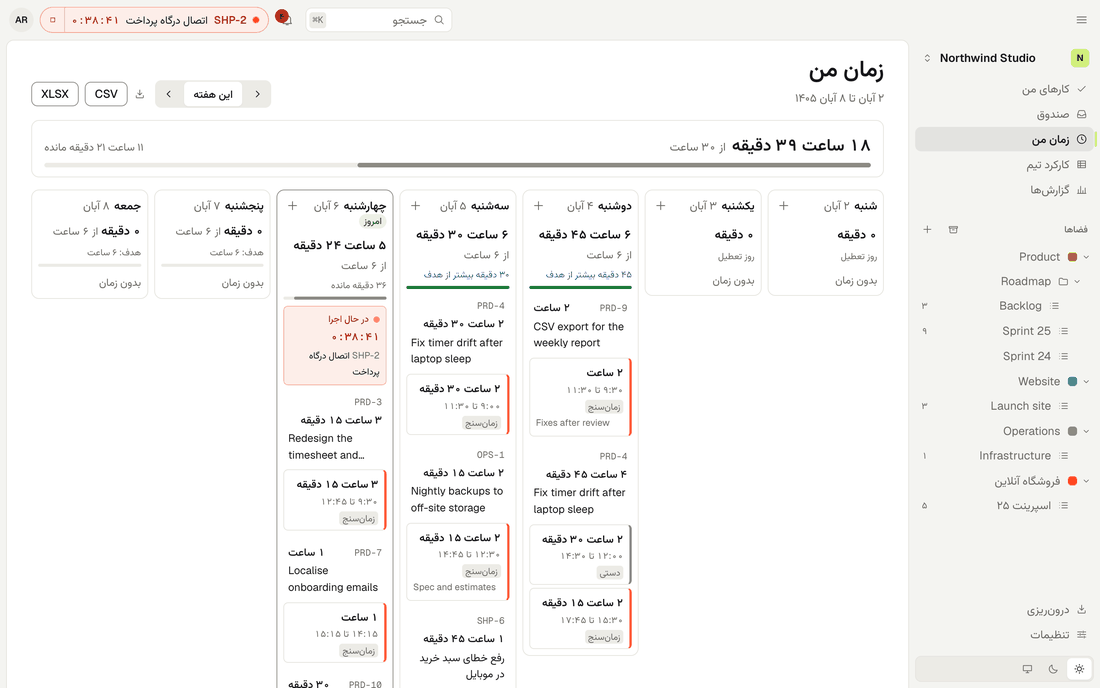
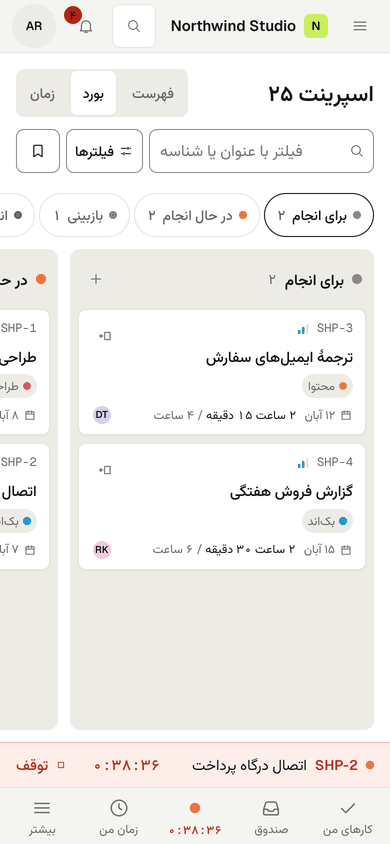
Every screen mirrors properly, the interface is fully translated into Persian, and the Jalali calendar is a choice each person makes, separate from the language.
کارها و زمانِ تیم، در یک فضای آرام.
Jalali weeks start on Saturday
My time, the timesheet and reports follow your calendar, for weeks, week starts and dates.
Persian digits work everywhere
Type ۱:۳۰ or ۹۰ into a duration field. Search folds Arabic and Persian forms of ی and ک.
Mixed teams are fine
One person can use English with the Jalali calendar while a teammate uses Persian with Gregorian dates.
-
Import
Bring your projects with you.
Importers read the export files the other tools already give you, so you can try a move without touching the old workspace.
| From | You upload | What comes across | Status |
|---|---|---|---|
| Trello | Board JSON export | Lists to statuses, cards to tasks, checklists to subtasks, labels to tags, members | Built |
| Any CSV | A CSV file | Columns you map yourself, with a preview | Built |
| ClickUp | CSV export | Spaces, folders and lists, statuses, tasks and subtasks, tags, priority, assignees, time entries | In progress |
| Jira | CSV export | Projects to spaces, issues and sub-tasks, statuses, priority, labels, assignees, worklogs | In progress |
| Taskulu | Project export zip or task CSV | Sheets to folders, lists, sections to statuses, tasks, checklists, tags, time logs | In progress |
| Asana | CSV export | Projects, sections to statuses, tasks and subtasks, tags, assignees | In progress |
Dry run first
Every import shows a preview before it writes anything: counts, warnings and fields it could not map.
All or nothing
The import is committed in one transaction. Running it again does not create duplicates.
People by email
Members are matched by email. Anyone else becomes a placeholder you can map to a member or invite.
The in-app import wizard is planned for v0.1, together with the importers marked in progress.
Open source
Yours to run, read and change.
Tockr is licensed AGPL-3.0-only. You can self-host it, modify it and share it. If you offer a modified version as a network service, you share your changes under the same licence.
There is no paid tier and no “enterprise” build with the useful parts held back. Contributions are signed off under the DCO, with no CLA.
The binary links fewer than twenty third-party Go modules, all under permissive licences (BSD, MIT or Apache-2.0), and the dependency audit lives in the repository.
Security, as it stands
- Passwords hashed with argon2id, sign-in rate limits, and the same answer for known and unknown accounts.
- A CSRF check on every request that changes data; session cookies are HttpOnly, SameSite=Lax and host-only.
- Permissions checked on the server for every route, and workspaces isolated from each other in the data layer.
- Parsers for durations, filters, imports and Markdown are fuzz-tested; uploads and archives have size and zip-bomb limits.
- The container image is distroless and non-root; the deploy examples drop all capabilities and use a read-only root filesystem.
- Releases are built to be signed with cosign and shipped with SBOMs.
- Report a vulnerability privately through GitHub security advisories; the security policy says what happens next.
A full security audit is planned before v0.1. Until then, treat Tockr as pre-release software.
FAQ
Straight answers.
Can I use it in production today?
Not yet. The core works: tasks, boards, time tracking, timesheets, reports, roles, realtime updates, email, backups. But v0.1 has not been released, there are no published binaries or images, and it is not ready for production data. Watch the repository for the release.
Is time tracking really free?
Yes. The timer, manual entries, timesheets, reports and exports are all in the open-source code. There is no paid tier, no per-seat pricing and no plugin to buy.
How big a team can one server handle?
Tockr runs as a single process on a single machine with SQLite, so it scales up, not out: there is no cluster mode. It is built and benchmarked for workspaces of tens of thousands of tasks on a small server. A PostgreSQL option is on the roadmap for v0.3.
Are there mobile apps?
No native iOS or Android apps, and none in the current plan. The web app is built for phones and tablets as well as desktops, down to 360 px wide, with touch drag on the board.
What is on the roadmap?
After v0.1: custom fields and a calendar view (v0.2); a PostgreSQL backend, S3 attachments, webhooks and API tokens (v0.3). Later: Gantt and timeline views, automations, OIDC single sign-on and more languages.
Does it phone home?
No. Tockr sends no telemetry. Its only outgoing connections are the ones you configure: your SMTP server, and Google or GitHub if you turn on their sign-in. This website loads nothing from other hosts either.
Can I get my data out?
Always. The database is one SQLite file, and tockr backup takes a consistent copy while the server runs. Workspace owners can export everything as JSON plus attachments, and every report exports to CSV or XLSX.
Where are other tools ahead?
Integrations and marketplaces, automations, native mobile apps, Gantt and timeline views, hosted plans with support, and years of polish. Tockr’s bet is narrower: a small, fast, self-hosted tool where time tracking and right-to-left languages are done properly from the start.
Start the clock on your own server.
Clone it, build it, and track the first hour in a few minutes. It is free, and it stays yours.